向 EA 添加 Indicator
在向 EA 添加 Indicator 之前,您首先需要在账户中添加一个 EA。添加 EA 后,您可以通过点击 EA 的 Indicators 部分中的 + Add 按钮来添加 Indicator。
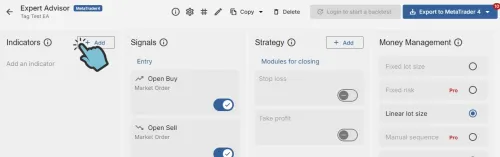
可用的 Indicators
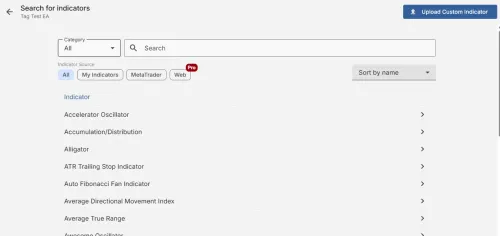
Section titled “可用的 Indicators”现在您将看到一个列表,其中包含所有可用的 MetaTrader 4/5 Indicators、您自己的 Indicators(如果您上传过的话),以及一些来自网络的 Indicators。您可以选择其中任何一个 Indicator 或上传新的 Custom Indicator。准备好后,点击 Next 将您想要的 Indicator 添加到 EA。
我们现在将选择标准的 Moving Average Indicator。在本教程的下一部分,我们将上传一个 Custom Indicator。
Indicator 参数
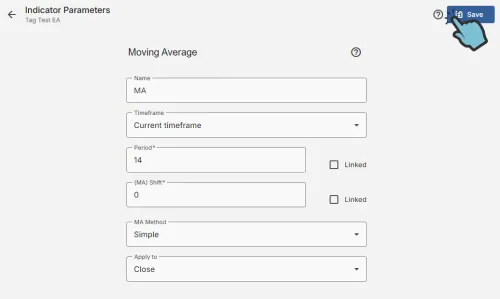
Section titled “Indicator 参数”点击您想要添加到 EA 的 Indicator 的 Next 后,您现在可以为 Indicator 指定名称并选择性地调整参数值。我们建议您为 Indicator 取一个简短、友好且容易记住的名称,特别是在多次使用同一个 Indicator 但设置不同(如不同的时间周期)时。
完成后,点击 Save 按钮,您的 Indicator 将被添加到 EA 中。如果 Save 按钮显示为灰色,说明您忘记输入必填的参数值。
将 Indicator 固定到特定的 timeframe
Section titled “将 Indicator 固定到特定的 timeframe”默认情况下,Indicator 运行在您的 EA 所附加的 chart 的 timeframe 上。这意味着当您将该 chart 切换到另一个 timeframe 时,您的 Indicator 会在新的 timeframe 上重新计算,依赖它们的 Buy 和 Sell 信号也会随之重新计算。因此,您可能会看到 EA 仅仅因为您更改了 chart 的 timeframe 就开仓或平仓。
如果您不希望 chart 影响您的 EA,请为 Indicator 设置一个固定的 Timeframe。在 webtool 中打开该 Indicator,并将 Timeframe 参数设置为 EA 应当运行的 timeframe。一旦设置了固定的 Timeframe,更改 chart 的 timeframe 将不再影响您的 Indicator 或信号,因此您的未平仓订单将保持不变。