Build your Expert Advisor without coding!
The no-code EA builder and forex robot creator for MetaTrader 4 & MetaTrader 5
EA Builder Pro is the ultimate no-code Expert Advisor and trading bot builder for MetaTrader. Create any automated trading strategy for forex, gold, indices, stocks, crypto or any other market your broker offers, without writing a single line of code.
Get Started For FreeTrusted by 300,000+ traders worldwide No credit card required - Free to start
Building Expert Advisors Made Easy
What Is EA Builder Pro?
EA Builder Pro is a freemium, no-code Expert Advisor builder and EA generator for MetaTrader 4 and 5, built to turn your manual trading strategy or algorithmic trading ideas into automated EA trading strategies in minutes, for forex, gold, indices, stocks, crypto or any other symbol your broker offers. Everything runs online in your browser: build an EA bot for MT4 or MT5, turn your favorite indicator into an EA, and backtest your EA online before you trade it.
You focus on your trading ideas. We do the heavy lifting.
No Coding Required
Build your EA visually with templates or the AI Agent. No MQL and no programmer needed: our Expert Advisor generator writes the code for you.
Full Trading Toolkit
Use any indicator, including your own custom indicators, set entry and exit rules, add Stop Loss, Take Profit and Trailing Stop, and manage risk with Money Management, even for complex strategies.
Cloud Backtesting & Export
Backtest in the cloud, then export clean MQL4/MQL5 code to automatically trade any instrument your broker offers on MT4 (MetaTrader 4) or MT5 (MetaTrader 5), on your PC or VPS.
Who Is EA Builder Pro For?
EA Builder Pro works for traders at every level, from your first automated strategy to advanced, fully custom systems.
Beginner
New to automated trading? Start fast with ready-made templates and the AI Agent. No coding needed.
Intermediate
Already trading manually? Add custom indicators and advanced modules to automate and refine your own strategy.
Expert
Building complex custom systems? Use advanced modules and risk management, then export clean MQL4/MQL5 code for your own setup.
Trusted by Traders Worldwide
Users
Backtests
Expert Advisors
Exports
How does EA Builder Pro work?
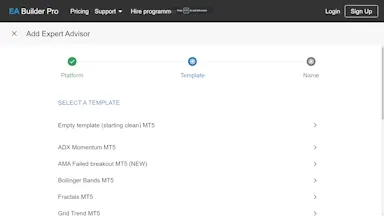
1 Get Started: Templates & AI Agent
Quick-start your EA creation by selecting one of our templates and have a working EA immediately or ask our AI agent to build your EA for you. Go ahead and try it yourself! Then, start adjusting the EA to match your ideas. Want to start from scratch? Just select the Empty template and add your indicators.
- MetaTrader 4
- MetaTrader 5
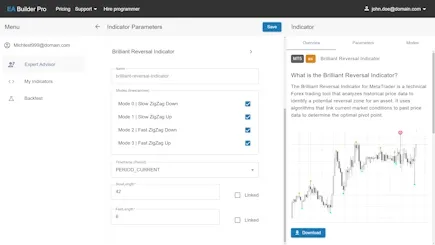
2 Add Indicators & Custom Indicators
Add standard MetaTrader indicators or search for an indicator in our Web Library. Found your own MT indicator? No problem, upload the Custom Indicator in any MT format, EX or MQL. Then, configure the indicator parameters as you normally do in MT and click Save. Now you are ready to create Trade Signals.
- MetaTrader indicators
- Web Indicators
- Custom indicators
- Import MQL4 & MQL5
- Import EX4 & EX5
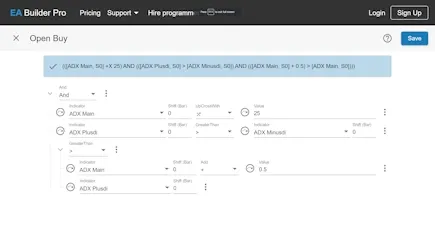
3 Create Entry and Exit Signals
Use trade Signals to define conditions for opening or closing orders. You can use your indicators, functions or fixed values to create any condition you can think of. Add conditions like crossover or price action. Use Drag and drop to rearrange your trade Signal. Click Save when you are done. Now you are ready to further enhance your EA by adding strategy Modules.
- Conditions (rules)
- Crossover
- Price Action
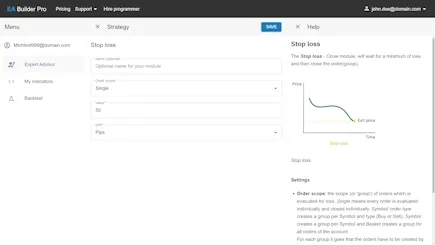
4 Add Stop Loss, Take Profit & Strategy Modules
Use strategy modules to manage your (open) orders, Stop loss and Take Profit values. You can also prevent orders from being opened by defining trading sessions and only open orders within these sessions. There are modules available for all kind of needs. New modules are added regularly. When done, continue to configure your Money Manager.
- Stop loss
- Take profit
- Trading times
- Max time to live
- And 16 more...
5 Set Money Management: Lot Size, Risk & Martingale
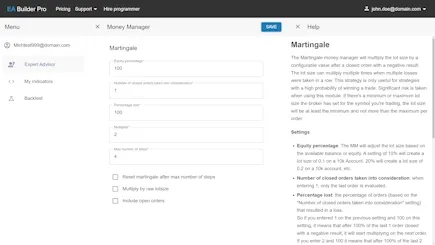
Your Money Manager determines how much risk your EA is allowed to take. Set a fixed lot size, a percentage of your account or use the Martingale strategy. Make sure you trade safely by taking low risks. When ready, click Save and you are ready to Run A Backtest.
- Fixed
- Linear
- Martingale
6 Backtest Your EA Online
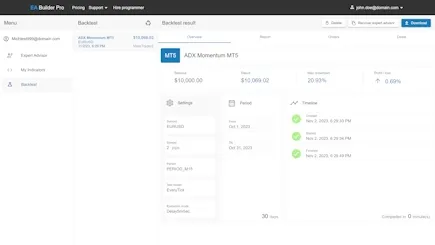
Run a backtest in the cloud by clicking on Run Backtest. Pick a time period to backtest, choose a test model, a timeframe (M5, M15, H1 etc.) and click Run. Your backtest is queued and ready to be processed. Click on Open to navigate to your backtest. Here you see your backtest dashboard, which shows a test report and the opened and closed orders and deals. When you are happy and want to download your EA, click Export to Metatrader and run it in MetaTrader on your local machine.
- Cloud Backtesting
- MetaTrader Parameters
- Report Dashboard
- Order/Deals overview
7 Export Your EA to MT4 & MT5
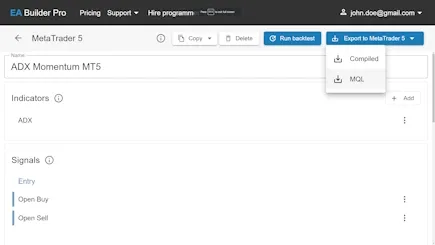
When you think it's time to export your EA to MetaTrader, click Export To MetaTrader and select your preferred format (MQL or EX). EX is convenient if you do not need to make changes to your EA or when you are not interested in the source code. If, however, you are interested in the source code, choose MQL. Copy the EA to your MetaTrader's Experts folder to be able to load the EA on the chart. That is it! You now have built your Expert Advisor.
- MQL4 & MQL5
- EX4 & EX5
- Readable code
Why do you need EA Builder Pro?
No coding and no programmer, generate instead
You no longer need to write a single line of code or spend a lot of money on hiring a programmer. You can build your EA with our simple to use tool and use unlimited indicators to replace your manual trading system. We create the code which represents your trading idea in seconds, no matter how complex, so you can focus on maximizing your results. Our high quality MQL code is written by professional programmers who have been programming EAs professionally for decades.
Everything you need for any expert advisor builder
EA Builder Pro has all features to create almost any of your complex custom trading strategies. Features include custom indicators, entry- and exit signals, advanced modules, risk management, export and backtest, including advanced customization features. We hand you all the building blocks you need to build a profitable Expert Advisor and offer you documentation, including a tutorial on our ea builder website to guide you step by step. Once you become proficient with our tool, you'll find out how incredibly fast, powerful and flexible it is.
Cloud backtesting
Backtest your strategies with a single click from the comfort of your sofa, so you can quickly identify profitable expert advisors or make adjustments. You can view and download the reports in EA Builder Pro offering you the same look-and-feel which you are already accustomed to from MetaTrader. Reports are displayed in the browser, without leaving our tool, or your sofa. Our always running backtesting service is ready to take on the next testrun. Give it a try for yourself!
Export to MetaTrader 4 & 5
When you think you are ready to run your strategy on your own device or VPS, export your strategy for MT4 or MT5. After you've downloaded the file, all you need to do is copy the expert advisor to MetaTrader. You will be able to use the generated inputs for optimizing your strategy additionally. You decide when you are ready for testing on a demo account and when you're ready for live trading. We always stress the importance of running on a demo account for a while first and ask you to verify it's taking the right trades, before running on a live account.
Access your EAs anywhere
Our platform is web-based, so you don't have to install anything on any device. Just browse to EA Builder Pro on your desktop, tablet or smartphone and continue building automated strategies, using your account. We made sure you get the best experience on any device and have delivered to our promise that you can build your expert advisor, no matter where you are, without the need for a traditional personal computer or workstation.
Support & FAQ
If you have technical problems when building your EA, do not hesitate to contact our support team. Also, if you feel like a feature is missing, please let us know by using our contact form. We are constantly in touch with our subscribers to work on the next feature. We're truly looking forward to hear about your ideas! For any questions you have about how the ea builder works, we'd like to refer you to our documentation and FAQ. We keep adding more content and examples to make things easier for you.
There is more...
Tutorial & documentation
Our tutorial & documentation can get you up to speed in no time, we've also got video tutorials which will help you to get you started. Read our blog for new tips & tricks. Our FAQ is updated frequently.
Future-proof
Our software is under constant development. New features and improvements are introduced regularly. We use the latest technologies to ensure the best performance and security. If you think that a feature is missing we would love to hear about it. We are always looking for ways to improve the tool. Your feedback is important to us!
- Constantly Evolving
- Regular releases
- Customer Feedback
Free Access
With our FREE PLAN you can start building your free expert advisor immediately, there is no need to register. Register if you would like to access your EA later or if you would like to create more free EAs. The application is web-based, so you don't need to install anything. Start now and discover why EA Builder Pro is the best MetaTrader EA Builder for you.
- Free Access
- Web-based
- Nothing to install
Build your EA now
Looking to hire a programmer to build the EA for you?
Some people prefer the personal attention of a programmer, who listens to their wishes to create any custom functions, indicators or EAs for them. Don't hesitate to hear about our partner's great offer on programming services.